Create sketches from your photos. Upload the selected image files and apply multiple available digital presets. Adjust the effects and get the custom visuals you want. Save the edited image copies to JPG, BMP, GIF, PNG, ICO, TIF, TGA, PSD, PCX, and WMF.
Turning a photograph into an artistic sketch using a set of pencils requires not only a lot of talent but also a great deal of patience. In the digital world, you can easily transform any digital photograph into a stunning sketch with Sketch Drawer in just a few steps. The resulting drawings look very professional, just as if you had painted them yourself, and you can batch-convert as many images as you wish.
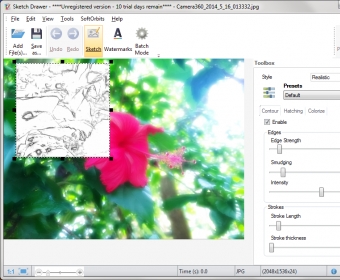
The program is fairly simple to use – it is equipped with a long list of presets that are nicely organized by sketch type. Thus, you have detailed sketches, realistic sketches, and classic sketches, each of them with a number of presets, such as pen, felt-tip pen, professional color sketch, expressive, pop art, schematic, and so on and so forth. Detailed sketches are the ones with less presets to choose from, but you can always create your own set by customizing existing presets or creating your own styles. You can vary the strength or the intensity of the edges, change the length of the strokes and their thickness, add color pencils or leave the sketch as a classic black and white drawing, etc. more
Each of these options and features are usually applied in a given section of the picture selected so that you can see the difference between the original photo and the resulting drawing. You can move this “preview window” around the picture to see how your changes may or may not affect a specific part of the photo. Once you’re happy with the preview, you just have to click on the “Run” button to perform the selected changes and apply the presets selected to the entire image.
Whenever you make a change on your image, apply a new effect or change the preset, you will see Sketch Drawer working its magic one layer at a time, as if an invisible hand were laying the different strokes on the canvas. The truth is that every change you make on your original image takes its time (including the occasional freeze), not to mention the final conversion of the entire image into a classy pencil sketch. This somehow laggy way of displaying the results together with our usual lack of patience may result in continuous “Not responding” messages, so try not to give the program too many orders at a time.
Sketch Drawer is not free, and it is not cheap either, but the results may well compensate for the somehow steepy license fee. Before going that far, though, you can always try the program’s free version for a while and see for yourself if the sketches it produces match your expectations.






Comments (1)